Skip to main content
Skip accessibility options
Reset settings
Close
Accessibility profiles
Visual impairment
Seizure and epileptic
Color vision deficiency
ADHD
Dyslexia
Learning
Content adjustments
Readable font
Dyslexia-friendly font
OpenDyslexic
Highlight headings
Highlight links
Highlight buttons
Hide images
Tooltips
Stop animations
Text size
+
+ +
+ + +
Line height
+
+ +
+ + +
Text spacing
+
+ +
+ + +
Color adjustments
Dark contrast
Light contrast
Invert colors
Change colors
High contrast
High saturation
Low saturation
Monochrome
Orientation adjustments
Reading guide
Reading Mask
Big black cursor
Big white cursor
Billing to Debt Management (Desktop App)
Close sidebar
Sections
Close tab
Search
Home
Courses
Billing to Debt Management (Desktop App)
Billing: Medical Coding & Medical Aids
Prescribe / Dispense (F12)
Prescribe / Dispense (F12)
Glossary: Code lookup
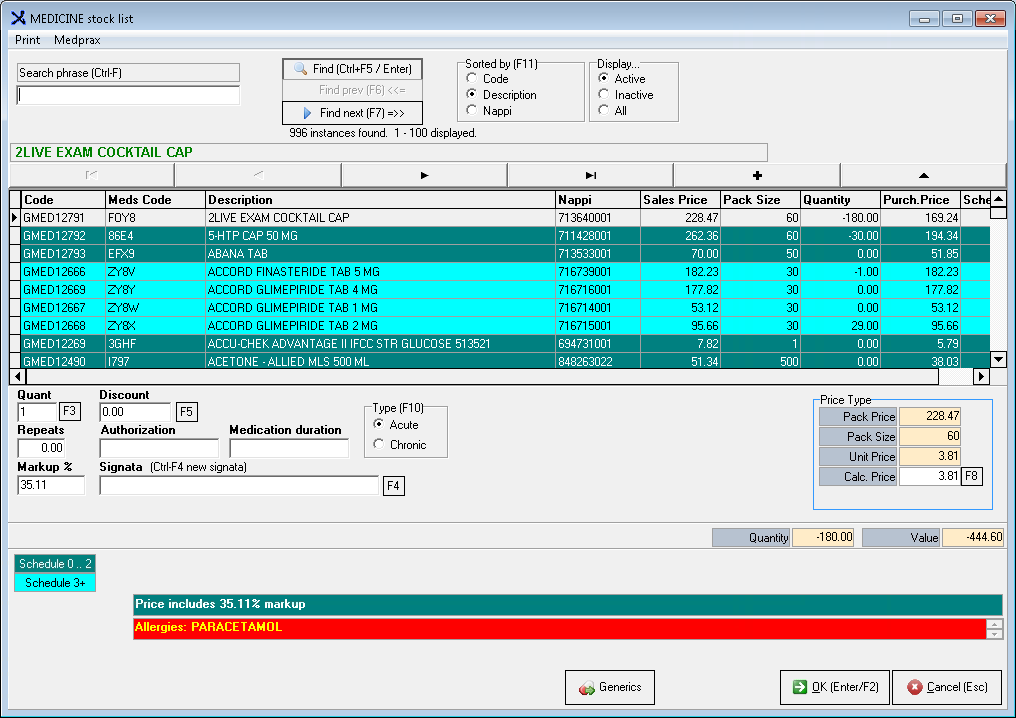
Click on
Dispense (F12)
Enter the
Medicine
I
te
m
Press
Enter
or click on
Find (Ctrl+F)
Press
Enter
or click on
OK (Enter/F2)
or
Double click
on the item to add the item to the Invoice
Repeat the Process for additional items
Last modified: Sunday, 5 July 2020, 1:22 PM
◄ Material / Consumables (F10)
Jump to activity
Jump to activity
Understanding Medical Codes And Modifiers
How are codes and Modifiers Controlled and Managed?
Medical Code Categories
Procedure Code
ICD-10 Code
Material / Consumables (F10)
Change Tariff amounts for Procedure Codes (Only 7.6 version)
SAMA Billing Rules
Types of Modifiers
Using Modifiers in GoodX
Modifier Billing Suggestions in the Desktop App
Medical Aids: Medical Aid Lists
Levy on Medical Aid
DBBS - Levy on Medical Aid
Medical Aid Levy Calculations
Medical Aids: Schemes
Medical Aids: Administrator
Medical Aids: Clearing house
Medical Aids: Managed Care
Medical Aid Posting Formulas
Medical Aid EDI Switches
Medical Aids: Anaesthetic rules
DA: Allocating a Medical Aid Rejection Message
DA: Remove Medical Aid Rejection Message
Tariff Codes Lists
Filtering of Tariff Codes
Edit Tariff Codes
Code Lists
Prescription Codes
CPT4 Codes
Cost Centres
Medicine Formularies
Medicine
Material
Time Billing Codes with Fixed Prices - Desktop App
Modifiers: 0051 to duplicate with 0057
Setup of Medical Aid Rejection Message
Setting up Time Billing Codes with Fixed Prices
Procedure Price List Screen Overview
How to Enable/Disable EDI Switch on Medprax Scheme Settings
Maintain Local Pricelists (Desktop)
How to Copy Local Prices and/or RVUs to Another Year
Add an Assistant in Med Debs version 7.8 and 8.0
Add an Assistant in GX Manage version 7.8 and 8.0
Link Assistant to a Creditor in MedDebs version 7.8 and 8.0
View Creditor (Assistant) Account
Patient Invoice: Assistant Code
Assistant Code 0018 Using Modifiers
Combinations (Protocols)
Print Combinations With Items
Print Combinations with Inactive items
Combinations: Start and end date
Export Combinations
Invoice Patients
Simple Invoice
Simple Invoice Screen
Simple (Dental Chart) Invoicing for Dental Practices
Comprehensive Invoice
Multi Invoice Screen
Setting Prices to Zero
Allocating Discounts on Invoices using Discount Tariff Codes
Setting up Estimates Templates
Estimates lists
Estimate Lists: Procedure Description List
Estimate Lists: Appointment Description List
Estimate Notes
Estimate List: Other doctors
Save an Estimate
Invoice an Estimate
View Estimates
Estimates from Simple Dental Screen
Submitting a Claim
Claim Submission: Zero Amounts
Submitting WCA Claims
Payment Plan (Medical Practitioner): Configuration
Payment Plan (Dental and Ortho): Configuration
Step 1: Payment Plan List
Step 2: Payment Plan Show Payment Plan Invoices for Date
Step 3: Generate Payment Plan Invoices
Post Invoice
Anaesthetics Code Billing
Self Billing Assistant Modifier
AM/PM Billing
VAT How
VAT Rate Change Procedure
Enabling of the Episode screen in Options
List of Episode Series
Book Episode Numbers
Report
Change Status of an Episode Number
Cancel Range Of Episodes
Explanation of the Episode Screen
Invoicing from MedDebs
Invoicing from the Diary
Invoice Corrections: Credit Notes 7.6
Invoice Corrections: Credit Notes 7.8
Invoice Corrections: Credit Notes 8.0
Invoice Corrections: Redo Transaction and Credit Note
Change Details on Invoice (NO CREDIT NOTE)
New Debtor Journal Capturing Screen: Default User Preference
Credit Note in Previous Financial Period
How to Undo the Capture of a Single Stock Item
Patient Receipt: Invoice Level
Patient Receipt: Item level
Patient Receipts - Unlinked
Medical Aid Receipt: Invoice Level
Medical Aid Receipt: Item Level
Medical Aid Receipts - Unlinked
Reciept Screen Overview
How to create a Cash Register
Cash Register Receipt
End Session
Capture User Cashup
End Cash Register Session
Reconcile Session
Receipts Written Back
Add to Receipt
Link Unlinked Receipts with Zero Receipts / Autolink Receipts
Move Receipt from one Debtor to another
Receipt corrections - Item Level
Payment to Patient / Medical Aid (Refund)
Payment to Patient / Medical Aid Written Back (Refund)
Payment To Patient / Medical Aid Add
Debtor Journals: Batch Screen
Journal Actions: Debtor Journals (Batch)
Journals: Old Screens
Inter debtor journals
Debtor / Med.Aid Outstanding
Patient and Medical Aid Paid
Debtor Enquiries
Item Level
Account Query from Diary screen
Account Query version 7.6
Account Query Screen
Account Query: Item Level Summary
Account Query: Item Level Allocation History
Account Query: Debtor Journal (Ledger)
Account Query: Debtor Journal (Ledger Action)
Account Query: Total value of Split Transaction
Account Query: Summary of Receipts
Account Query: Shift outstanding Amount to Patient/Medical Aid
Account Query: Post Assistant Invoice to Creditor
Account Query: Change Invoice Details
Account Query: Change Item Details
Account Summary
Print Tax Invoice
Reprint of Invoice
Print TAX Invoice with Lab Numbers
Print TAX Invoice without ICD-10 Code
Invoice Printing Setup
E-mail Tax Invoice
Invoice Email Setup
Setup a New Statement
Print Statement Normal
Print Statement with Lab Numbers
Print/Save Statement as PDF
Print a Debtor Statement from an Appointment
Print a Debtor Statement without selecting an Appointment
Statement Notes
General statement message
Calculate Interest
Adding Interest to Debtor
Adjustment Journals per Invoice
Adjustment Journals Per Debtor
Post stored Adjustment Batch
Reverse a Journal Batch
Opening Balances: Patients
Opening Balances: Medical Aid
Opening Balances: Patients: Import
View busy batches
Archiving and Restoring of Transactions version 7.6
Archiving of Transactions version 8.0
Restore Archived Transactions version 8.0
Archive Enquiry
Insurance agent
Queries: Totals
Email Mulitple Invoices
Debtor Transaction Groups
Setup Example for Bulk Statements
Debtor Statement Bulk
Credit Control Guidelines
Using the Credit Control Assistant (CCA)
Business Process Design
Example for Credit Control Cycle Steps
CCA Categories & Process Implementation
Credit Control Setup
Multiple Debtors Actions
Multiple Invoice Actions
End Batches (All transactions)
Debtors Month-End ONLY version 7.6
Multiple Financial Month-End ONLY version 7.6
Multiple Debtors & Month-End version 7.8
How to do Month End on Desktop
Change Tariff amounts for Procedure Codes (Only 7.6 version) ►