Text size
Line height
Text spacing
Cash Register receipt is for patient payments that are received in the practice rooms at the cash register or reception.
1. Click on Payments in the Cash Register module

2. Choose the correct entity if you have more than one.
3. Search for the patient/debtor and click on OK(F2)
4. Type in the amount to allocate and press TAB on your keyboard, note that the Level(F4) function will allow you to receipt the invoice on Item level (each line that was billed) or on Invoice level (the total invoice combined).
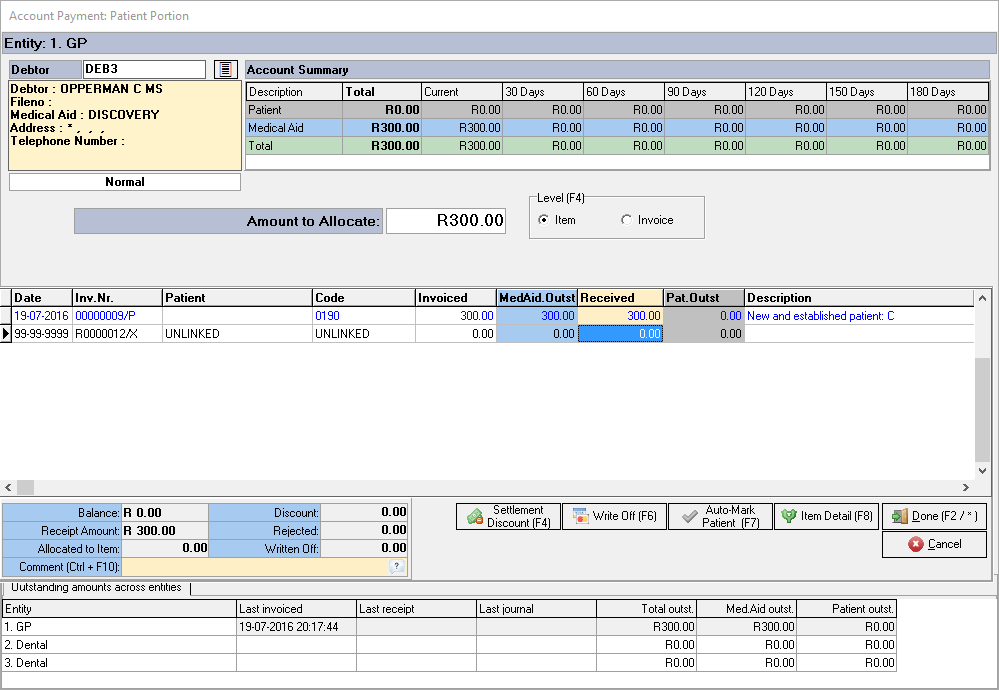
5. Allocate the amount to the correct invoice or items. Make sure the line is blue and you've balanced to a zero (blue Balance entry on the left) before you can click on Done(F2). Note that you can also do a Settlement Discount(F4) and Write Off(F6) from this screen

6.Choose your payment type (how the money is received)
7. Type in the Info (Reference of the payment or thank you note. This info field will display on your statement.}
8. The Amount Tendered is the amount that the patient paid; the change will then be displayed.
9 Click on OK(F2)
10. You will now have the option to print a statement and receipt.