Patient Identifier Navigation
Why This Matters?
The Patient Identifier is a facial recognition feature used to confirm a patient's identity and help ensure that the correct patient record is accessed. The system compares the patient's captured image with the profile pictures stored in existing patient records to identify possible matches.
The Patient Identifier can also be used when working with a new patient, allowing a patient file to be created and a profile picture to be captured, or to add a profile picture to an existing debtor/patient record. This helps keep patient records up to date while improving the accuracy and security of patient identification.
š”Ā Please Note: To verify an existing patient, the patient must be registered as a Debtor and have a profile picture stored on their electronic file.
- Start on the Patient Identifier screen.

-
- For navigation, seeĀ Diary Screen Navigation.
Sections
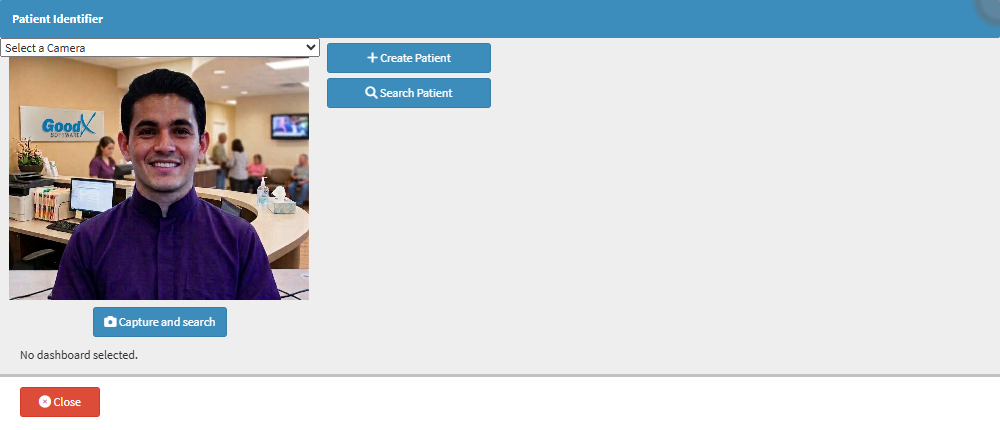
- Image Capture
- Action Buttons
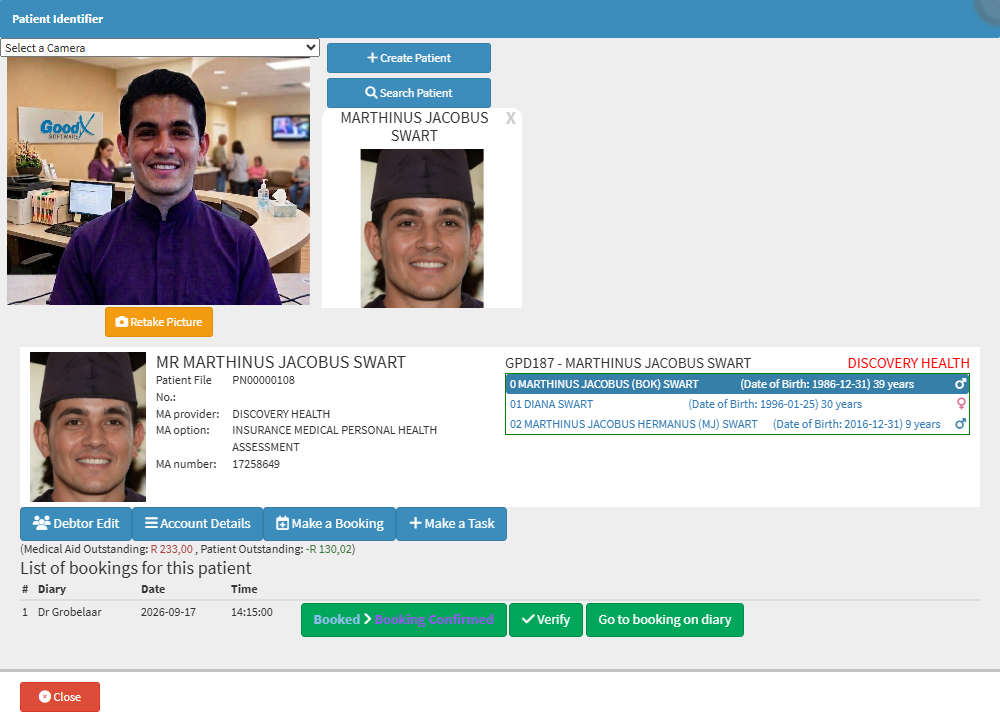
- Patient Identified Information
- Patient Detail
- Patient Action Buttons
- List of Bookings for This Patient
Image Capture

- Select a Camera: Select the camera for capturing the patient's image.
- Capture and Search: Captures the patient's image and searches for matching patient records. For details, see Verifying a Patient Booking with the Patient Identifier.
š”Please Note: Once the image has been uploaded, the Capture and Search button will change to the Retake Picture button to retake the image.
Action Buttons

- Create Patient: Creates a new patient record. For details, see Web 1.19 - Patient Details.
- Search Patient:Ā Searches for an existing patient record. For details, see Patients List Screen: Navigation and Use.
š”Please Note: Once a patient has been selected or created, more options will become available. You can remove search results when you no longer need them.
Patient Identified Information

Patient Details

- Patient: Title, full name, and surname.
- Patient File No.: Patient's unique file number.
- MA Provider: Patient's medical aid provider.Ā
- MA Option:Ā Patient's medical aid option or plan.
- MA Number: Patient's medical aid membership number.
- Debtor Number: System-generated debtor identifier.
- Debtor: Debtor's full name and surname.
- Medical Aid: Medical aid provider.
- Medical Aid Members: Name, age, and gender of the main member and dependants.
Patient Action Buttons
![]()
- Debtor Edit: Opens demographic details for editing. For details, seeĀ Web 1.19 - Debtor Details.
- Account Details: Accesses the debtor and patient's account information. For details, see Navigating and Understanding the Account Details Screen.
- Make a Booking: Create a booking for the selected patient. For details, seeĀ How to Book an Existing Patient.
- Make a Task: Creates a new task item linked directly to the selected patient or booking. For details, see Create A New Task.
List of Bookings for This Patient

- Medical Aid Outstanding: Outstanding medical aid amount.
- Patient Outstanding: Outstanding patient amount.
- #: The patient's booking number.
- Diary: Displays the practitionerās diary where the booking was made.
- Date: Scheduled booking date.
- Time: Scheduled booking time.
- Advance Booking: Advances the booking status. For details, seeĀ How to Advance the Status of a Booking.
- Verify Patient:Ā Confirms the patient's identity has been verified.
- Go to Booking on Diary: Opens the booking date in the diary and selects the booking.