Why This Matters:

Service centres serve as clear indicators of exact locations where a Patient was examined or treated, such as in an ambulance, theatre, ward, or a specific practitioner's room. Configuring these location profiles provides your practice with a centralised management hub to monitor and structure administrative points alongside linked stock warehouses. Proper management of these settings remains essential for maintaining correct data flows across financial workflows, applying accurate facility or non-facility tariffs, and preventing processing errors during daily operations. Your system additionally allows for multiple service centres to be linked to a single warehouse, meaning various treatment areas can draw supplies from a central storage point while still maintaining individual usage data. Multiple warehouses, however, cannot be linked to a single service centre.
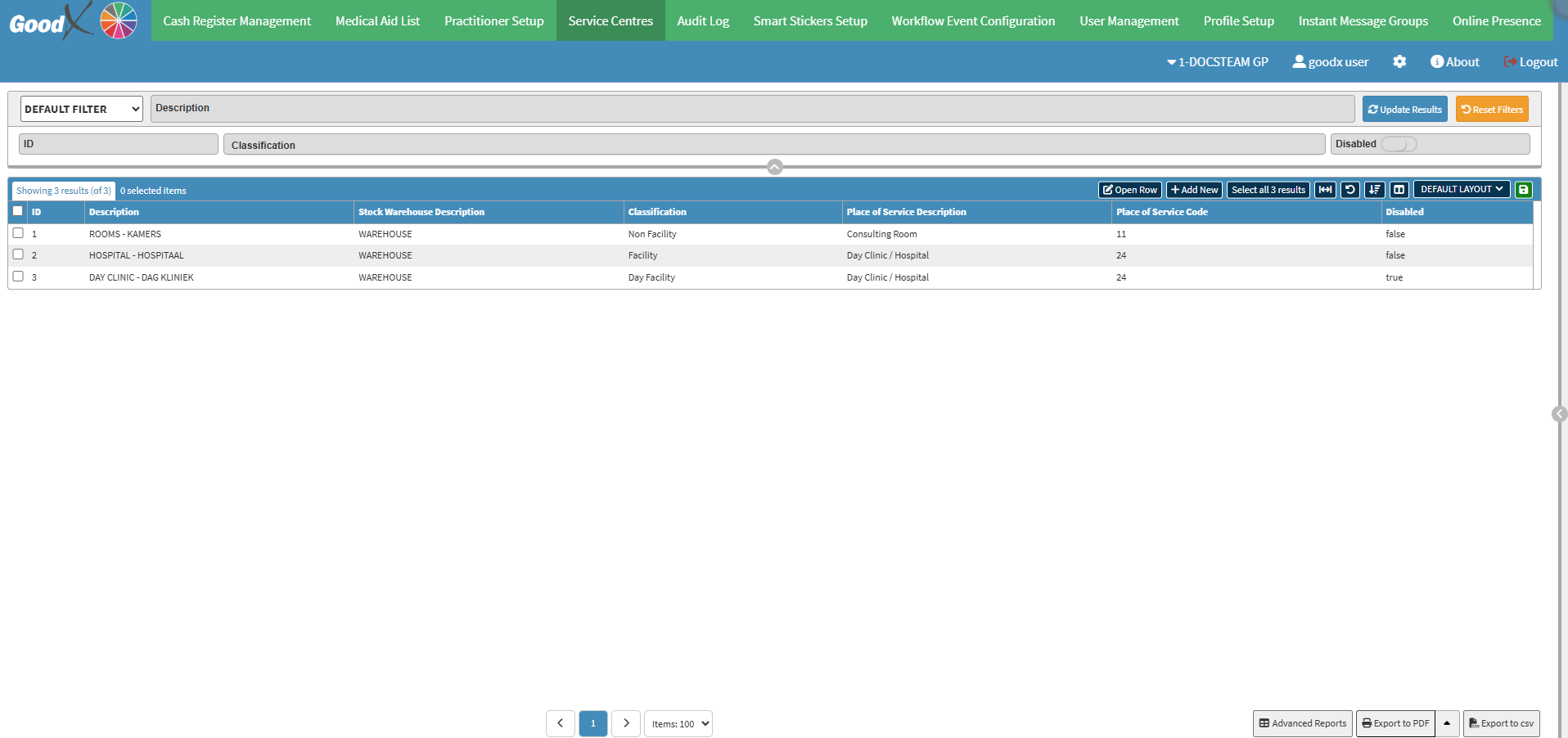

 

  • Start on the Service Centres tab screen.

Sections

  • Filters
  • Screen Columns Action Buttons
  • Columns
  • Page Options

Filters

  • Filters Detail Fields:
    • Default Filter: Select a preset filter configuration from the drop-down menu to quickly adjust how data displays.
    • Description: Type keywords or names to isolate matching service centres.
    • ID: Input the unique numerical system identifier to instantly locate a specific record.
    • Classification: Input operational categories to filter your list by specific facility types.

  • Click on the Disabled toggle to filter on disabled service centres.

  • Click on the Update Results button to refresh the list after the filters have been selected.

  • Click the Reset Filters button to clear the filters that have been set.


Screen Columns Action Buttons 

💡Please Note: For more information about the remaining screen column action buttons, see Screen Column Action Buttons Navigation.

  •  

Columns

  • ID: Unique system identifier automatically assigned to each entry.
  • Description‎: Custom name or title given to specific rooms or locations within your practice.
  • Stock Warehouse Description: ILinked inventory facility or warehouse assigned to handle stock for that location.
  • Classification: Operational category, such as facility or non-facility, assigned to the record.
  • Place of Service Description: Official clinical designation or room type used for billing and administrative identification.
  • Place of Service Code: Standardised industry or billing code associated directly with your specific location type.
  • Disabled: Indicates whether the location entry is currently inactive within your system to prevent further selection.

Page Options


Last modified: Monday, 20 July 2026, 8:18 AM


