Why This Matters?

The Staff List displays the staff members associated with the selected Hospital Case, including their role, name, and practice number.

The Staff List provides a clear overview of the staff involved in the patient's hospital care, making it easier to see which staff members are associated with the Case and their respective roles. Keeping this information together makes it readily accessible when reviewing or managing the patient's Hospital Case.
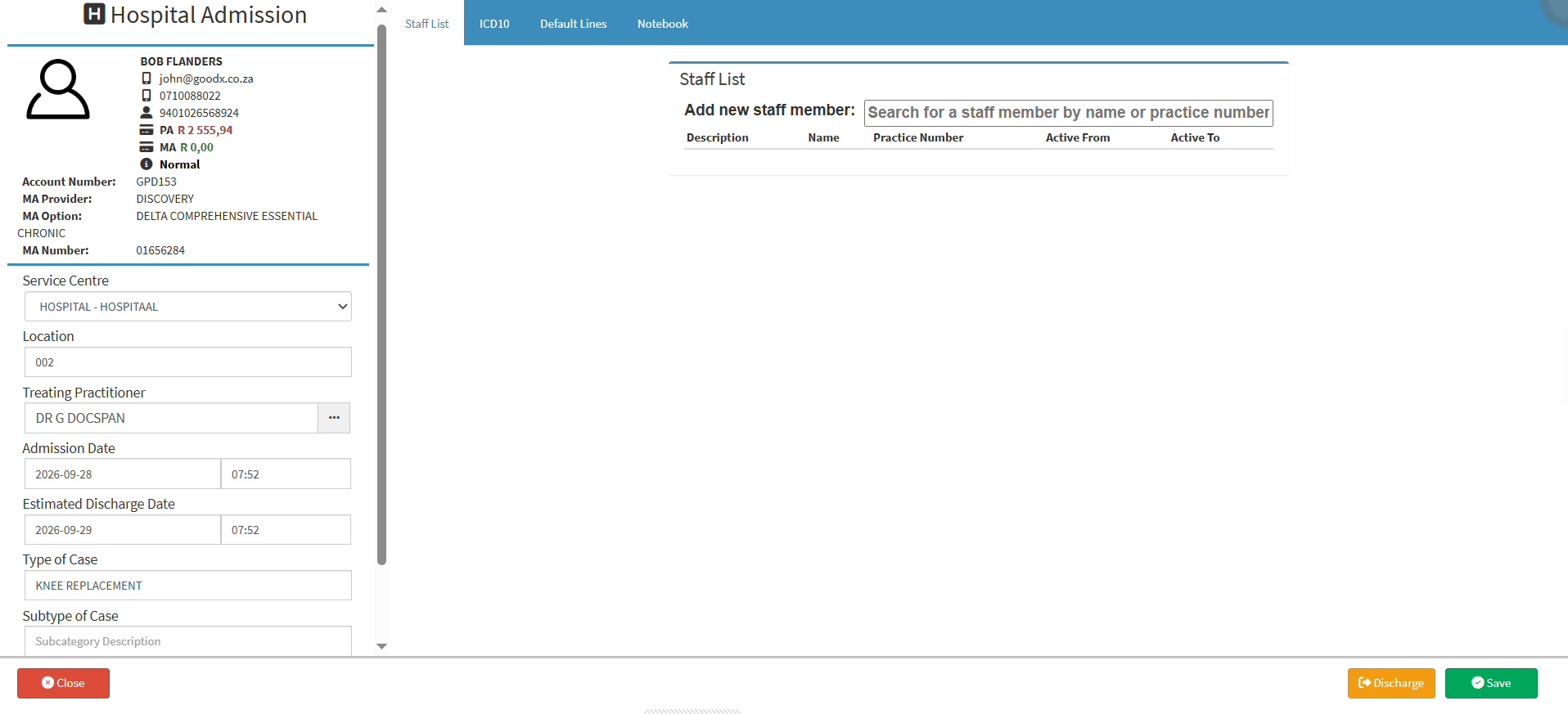

  • Start on the Hospital Case screen.

Sections

  • Add Staff Member 
  • Columns

Add Staff Member

  • Add New Staff Member: Search for and add a staff member by entering their name or practice number. For details, see How to Add/Edit an Employee.

Columns

  • Description: Indicates the role or description of the staff member within the practice.
  • Name: Displays the name of the staff member.
  • Practice Number: Displays the practice or professional registration number associated with the staff member.
  • Active From: Indicates the date from which the staff member becomes active within the practice.
  • Active To: Indicates the date on which the staff member's active status within the practice ends.
  • Delete Button: Removes a staff member from the patient's case list.

Last modified: Friday, 16 October 2026, 10:28 AM