Diary Timeslot History Navigation
Why This Matters?
The Diary Timeslot History shows the changes made to a specific timeslot in the Diary, including when they were made and by whom.
This is useful when you need to understand why a timeslot is available, unavailable, or different from its original setup. Reviewing the history makes it easier to investigate scheduling queries, identify changes that may have affected appointment availability, and understand how the Diary schedule has changed over time.
💡 Please Note: The Diary Timeslot History tracks changes to the timeslot itself and does not track changes made to a booking within the timeslot.
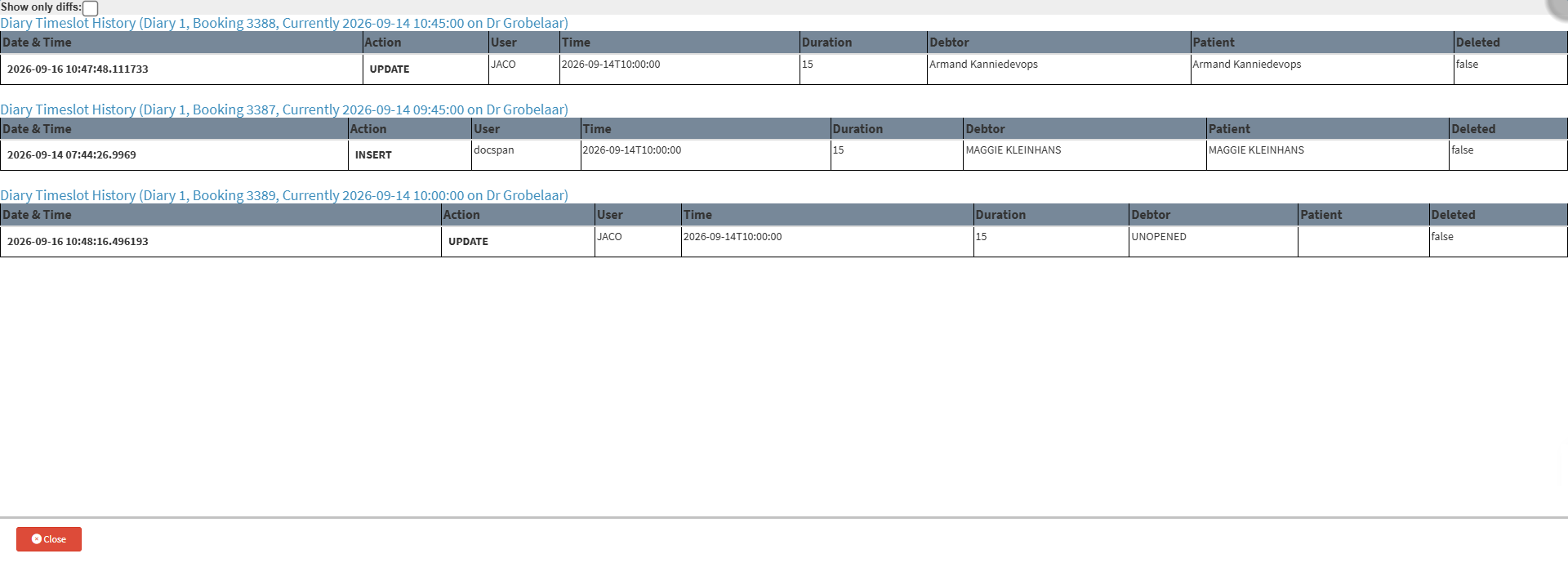
- Start on the Diary Timeslot History screen.

-
- For navigation, see How to View the Diary Timeslot History.
Sections
- Filter Diary Timeslot History
- Columns
Filter Diary Timeslot History
![]()
- Show only diffs: Displays only changes made to the timeslot.
💡Please Note: Ticking the Show Only Diffs checkbox displays only the modified fields for that specific timeslot, hiding unchanged details.

Columns
![]()
- Date & Time: Date and time when an action was recorded on the timeslot.
- Action: Action performed on the booking, such as inserting or updating a record.
- Insert: The first time an action was added to the timeslot.
- Updated: Any changes made to the timeslot.
- User: User who performed the action.
- Time: The scheduled date and time of the timeslot.
- Duration: Allocated time for the timeslot.
- Debtor: Debtor linked to the booking associated with the timeslot.
- Patient: Patient linked to the booking associated with the timeslot.
- Deleted: Shows whether the time slot has been deleted.
💡Please Note: Timeslots cannot be deleted from the diary, and therefore it will always be false.
