Why This Matters?

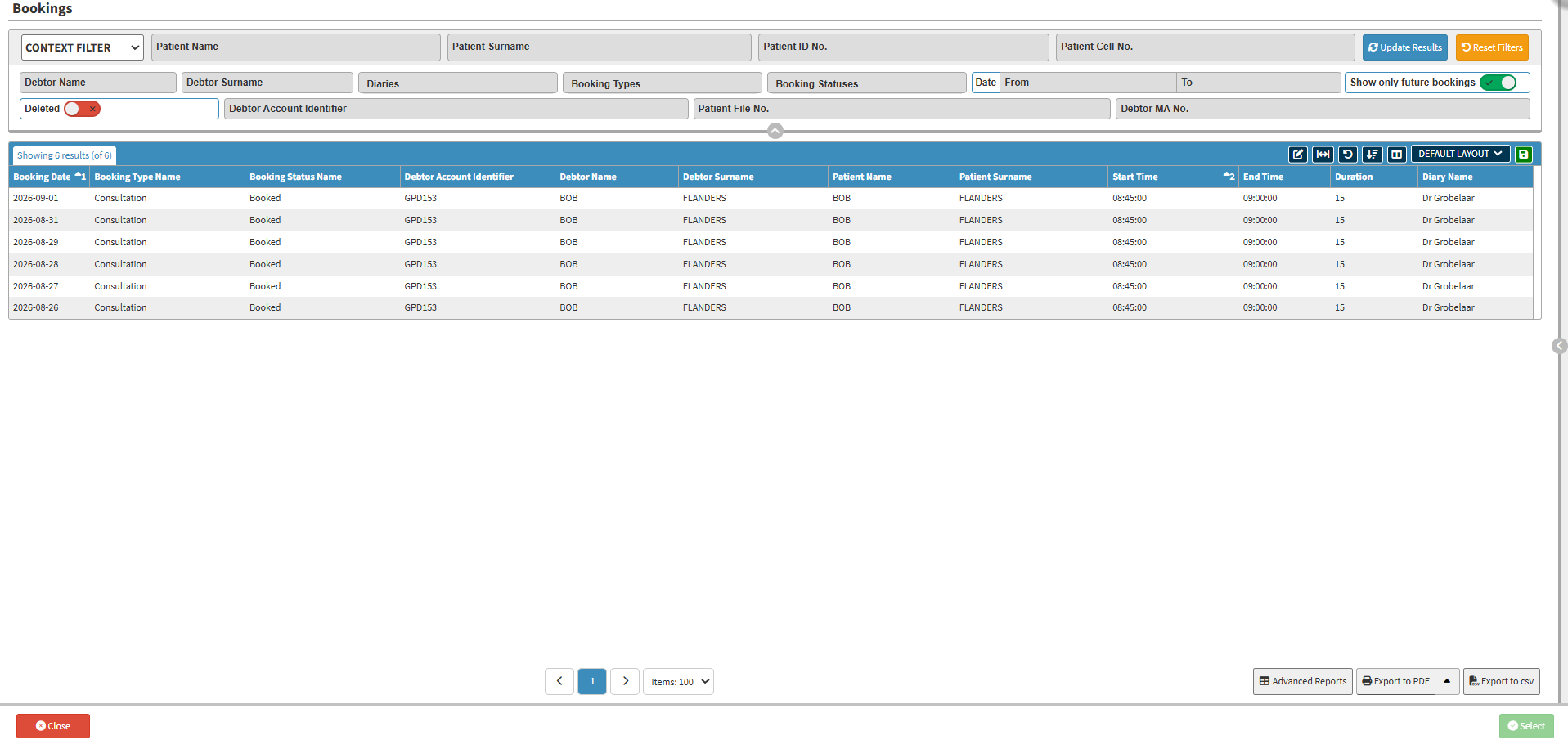
The Bookings screen provides a central place to search for and locate bookings across the practice. You can search using patient or debtor information to quickly find the required booking without manually checking individual diaries. Using the Bookings screen saves time and makes it easier to locate, review, and manage bookings, particularly when working with multiple practitioners or diaries. It provides quick access to the information you need and supports a more efficient booking management process.

  • Start on the Bookings screen.

Sections

  • Filters
  • Screen Column Action Buttons
  • Columns
  • Page Options

Filters

  • Context Filters: Filters bookings by broader practice criteria such as practice branch, doctor, or booking type.
  • Default Filters: Pre-sets the standard search filters that load automatically whenever you open the screen.
  • Patient Name: The name of the patient.
  • Patient Surname: The surname of the patient.
  • Patient ID No.: The ID number of the patient.
  • Patient Cell No.: The cellphone number of the patient.
  • Debtor Name: The name of the debtor.
  • Debtor Surname: The surname of the debtor.
  • Diaries: The name of the diary or diaries.
  • Booking Types: The booking type.
  • Booking Statuses: The booking status.
  • Date From and To: The date range.
  • Show only future bookings: Limits the list to show only bookings scheduled in the future.
  • Deleted: Includes deleted bookings in the results.
  • Debtor Account Identifier: Account number assigned to the responsible debtor.
  • Patient File No.: The patient's file number.
  • Debtor MA No.: The debtor's medical scheme number.
  • Update Results: Applies the filters and refreshes the screen.
  • Reset Filters: Clears all filters and returns to the default view.

Screen Columns Action Buttons

Columns

  • Booking Date: Scheduled date of the booking.
  • Booking Type Name: The type of booking, for example, Consultation.
  • Booking Status Name: The current status of the booking, for example, Booked.
  • Debtor Account Identifier: The debtor's account number.
  • Debtor Name: The debtor's first name.
  • Debtor Surname: The debtor's surname.
  • Patient Name: The patient's first name.
  • Patient Surname: The patient's surname.
  • Start Time: The time the booking starts.
  • End Time: The time the booking ends.
  • Duration: The length of the booking, in minutes.
  • Diary Name: The diary the booking was made in.

Page Options

  • Page Options: Adjust items displayed per page, switch between pages, view advanced reports, or export data to PDF or CSV. For details, see Page Options Navigation.

Last modified: Saturday, 29 August 2026, 9:57 PM


