Text size
Line height
Text spacing
Add Stock Item:
You need the following information when you want to add a stock item:
1. Full description,
2. Schedule of medicine,
3. Pack Size,
4. Price, and
5. Nappi Code.
When you have all the information open your Stock Module.
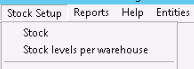
Click on Stock setup.
Choose Stock.
Click on the correct category.
Click on OK
* If you use IQest the Stock Code must start with GMED
* If you use Medprax the Stock Code, depending on which category, the item must start with GMED (Medicine) or 0201 (Materials)
** Non-Stock Items or Consumables, items which do not have a Nappi code, you must use '999999 999' in the Nappi data field.