- Open your Diary screen
- Click on Administration at the top of the screen
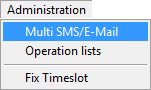
- Choose the selection to SMS or E-mail

- Select the date frame under Between Dates
- The time frame can also be selected under Between Times
- Tick all the Type of Appointments that you want to send notifications to
- Choose the selected Doctor(s)
The following "Message" will pop up

- Select the Message you want to send
- Send date: You can either send the SMS/Email on the current date or select a date that the Message must be sent
- Send time: You can either send the SMS/Email on the current time or select a time that the Message must be sent
Last modified: Monday, 23 March 2026, 12:01 PM