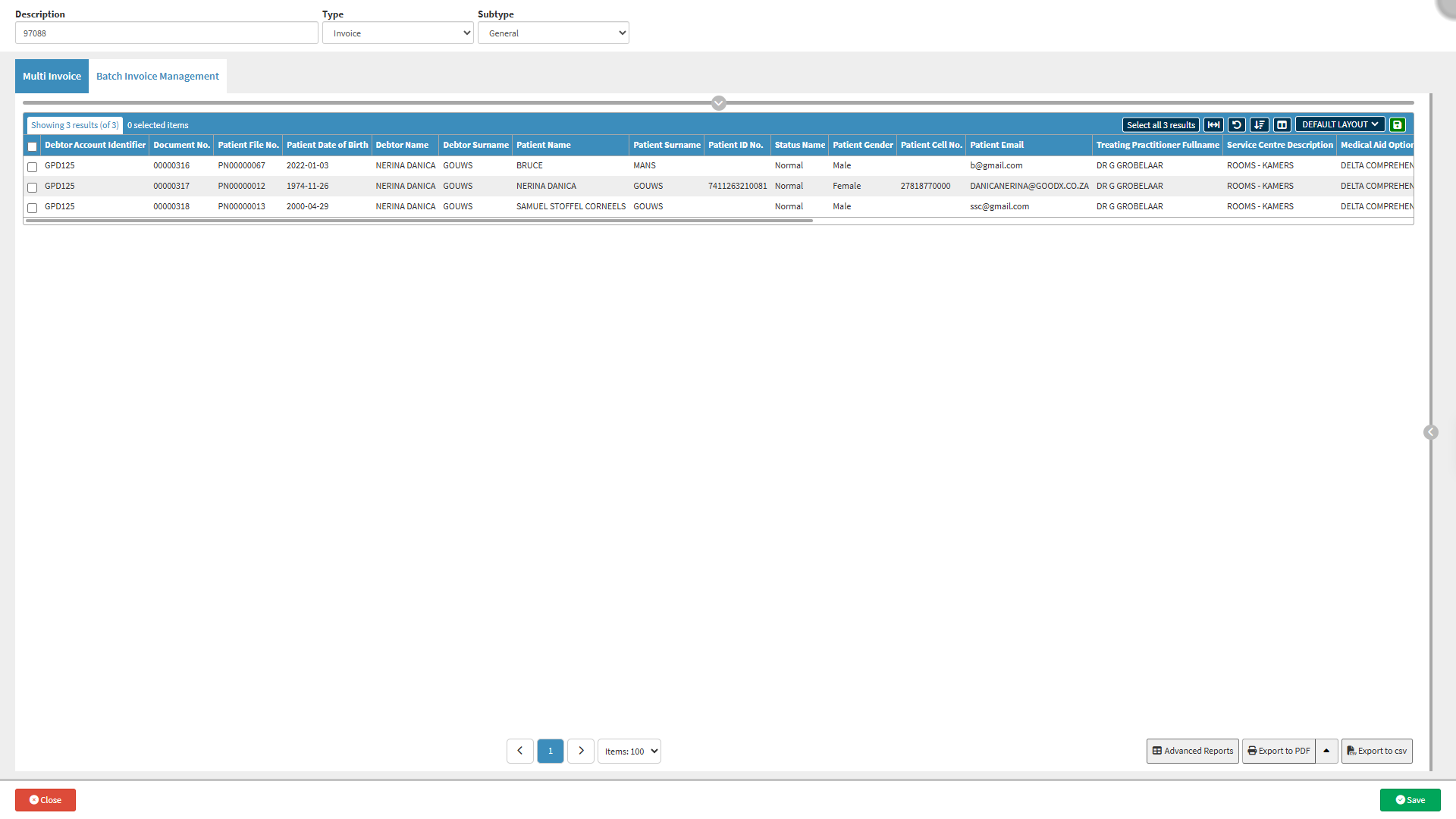
The Multi Invoice screen allows you to create and manage batches that contain multiple Invoices. These batches may include Invoices for the same Debtor across different dates or for multiple Debtors within a single batch. This functionality is especially useful for Bureaus and Practices that process high volumes of billing, as it streamlines the invoicing process and reduces manual effort.
By grouping Invoices into batches, the Multi Invoice screen improves efficiency, ensures consistency in billing, and simplifies reconciliation and reporting. It helps maintain accurate financial records and supports faster claim submission, resulting in a smoother, more controlled billing workflow within the Practice.
Screen Column Action Buttons: Provides tools to customise displayed columns and save preferred layouts for future use. For details, see Screen Column Action Buttons Navigation.
Columns
Debtor Account Identifier: Account code or number assigned to the debtor.
Document No.: Invoice, statement, or transaction document number.
Patient File No.: Internal medical record or file number assigned to the patient.
Patient Date of Birth: The patient's date of birth.
Debtor Name: First name of the debtor.
Debtor Surname: Surname of the debtor.
Patient Name: First name of the patient.
Patient Surname: Surname of the patient.
Patient ID No.: ID or passport number of the patient.
Status Name: Type of account or claim associated with the debtor.
Patient Gender: Gender of the patient.
Patient Cell No.: Mobile phone number of the patient.
Patient Email: Email address of the patient.
Treating Practitioner Fullname: Full name of the treating practitioner.
Service Centre Description: Service location where care was provided.
Medical Aid Option Name: Medical aid plan or option scheme of the patient.
Service Date: Date on which the medical procedure or consultation took place.
Booking/Booking Date: Type and date the appointment was scheduled.
ICD10 Code(s): ICD-10 diagnosis code(s) associated with the visit.
Billing Code(s): Procedure or tariff codes used to bill the medical aid or the patient.
CCI Status Name: Credit Control Interface (CCI) or debt collection status, such as In Hand, Legal Action, or Promise to Pay.
CCI Last Touch: Date and time the account was last actioned by credit control or debt collection.
Post Period: Financial period (month/year) in which the transaction was recorded.
Turnover: Total revenue amount billed for the line item or transaction.
MA Turnover: Portion of total turnover billed to the medical aid.
Patient Turnover: Portion of total turnover billed directly to the patient, such as co-payments.
Outstanding: Total unpaid balance remaining on the account.
MA Outstanding: Unpaid balance owed by medical aid.
Patient Outstanding: Unpaid balance owed by the patient.
Receipts: Total payments received against the transaction or account.
Journals: Financial adjustments, write-offs, and manual credit or debit entries applied to the account.
Page Options
Page Options: Provides tools to navigate between pages, adjust the number of Items displayed, and export or save data for further use. For details, see Page Options Navigation.