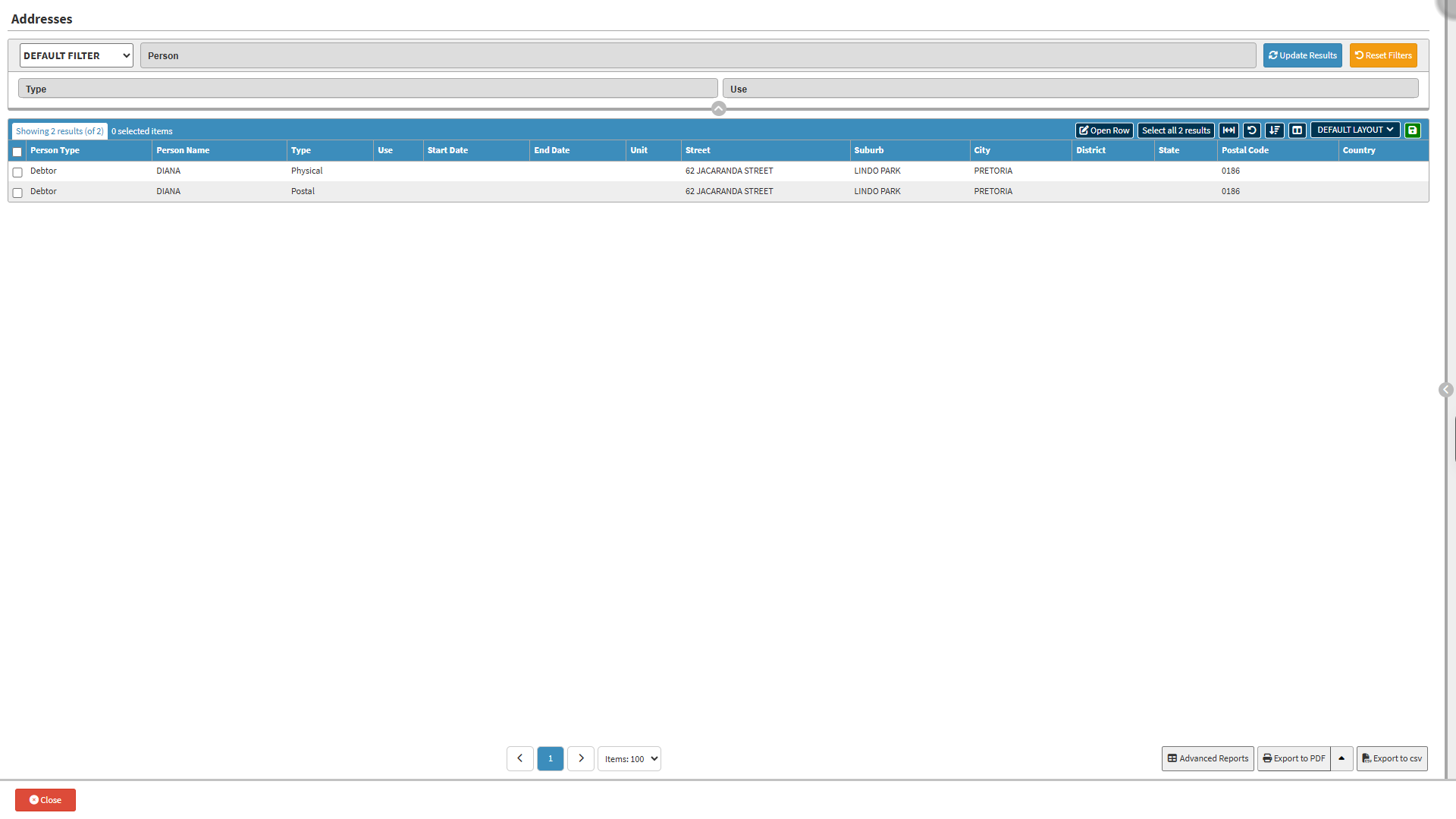
Understanding how to navigate and use the Addresses screen is important for ensuring that every Debtor has accurate and up-to-date Address information linked to the correct person. The features on the screen make it easy to filter results, view or edit specific Addresses, adjust the Columns for clearer analysis, and export the information when needed. Using these tools helps maintain reliable records and supports efficient communication, billing, and account management.
Default Filter: Select and apply previously saved search criteria.
Person: Filters results based on the first name of a patient or debtor.
Type: Filters results based on the category of address.
Postal: Address used for mail delivery.
Physical: Actual geographic location where the person resides.
Both: Includes both postal and physical address types.
Use: Filters results based on the intended purpose of the address.
Home: Address for personal residence.
Work: Address for place of employment or business.
Temp: Address used on a temporary basis.
Billing: Address used specifically for sending invoices and billing statements.
Reset Filters button: Clear all entered filter criteria.
Update Results button: Apply the completed filter criteria to update the Results list.
Screen Columns Action Buttons
Screen Column Action Buttons: Provides tools to customise displayed columns and save preferred layouts for future use. For details, see Screen Column Action Buttons Navigation.
Columns
Person Type: Indicates the category of the person linked to the address.
Person Name: Name of the person associated with the address.
Type: Specifies the address type.
Use: Indicates the purpose of the address.
Start Date: Date when the address became active.
End Date: Date the address was deactivated or replaced.
Unit:The unit, flat, or apartment number of the address.
Street: Street name and number where the person resides.
Suburb:Suburb or neighbourhood of the address.
City:City or town linked to the address.
District:District or local municipal area of the address.
State:Province or state where the address is located.
Postal Code:Postal code used for mail delivery to the address.
Country:Country where the address is located.
Page Options
Page Options: Provides tools to navigate between pages, adjust the number of Items displayed, and export or save data for further use. For details, see Page Options Navigation.
Last modified: Saturday, 7 November 2026, 12:27 PM