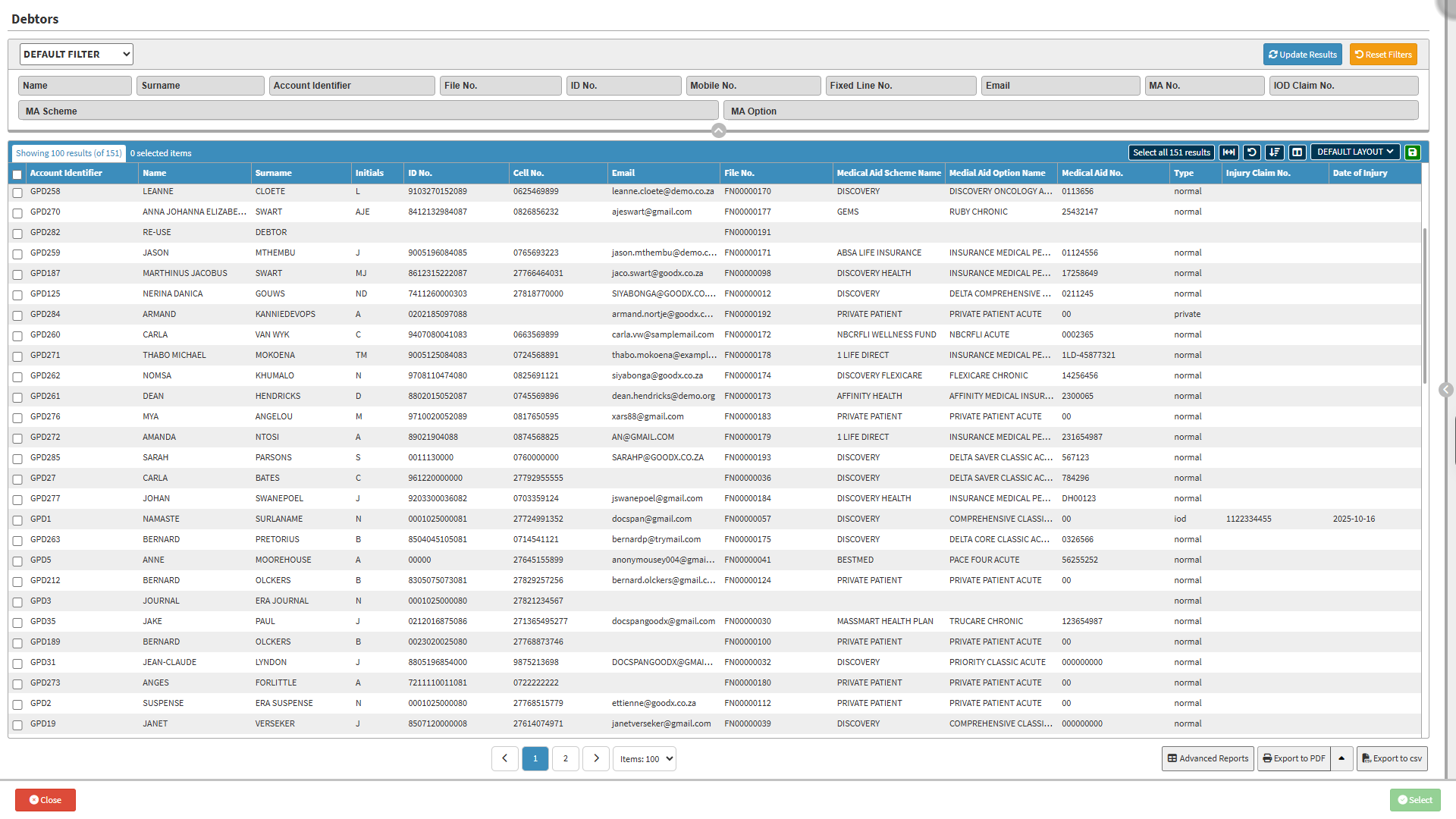
The Debtor List provides a central view of the demographic information for main members and their dependants stored in the system. It provides quick access to personal and contact information, along with related account, clinical, and financial information.
The Debtor List also provides search and filter options to help you quickly find the correct debtor when working with a large number of accounts. Once you have found the debtor, you can access their information and continue with the required account-related tasks.
Together, this information and these functions make it easier to manage debtor records, update information, and access related information without searching through different areas of GoodX.
Default Filter: Select and apply previously saved search criteria.
Name: The debtor's name.
Surname: The debtor's surname.
Account Identifier: The unique identifier for the debtor's account.
File No.: The system-generated file number.
ID No.: The identification number of the debtor.
Mobile No.: The mobile number of the debtor.
Fixed Line No.: The fixed-line contact number of the debtor.
Email: The email address linked to the debtor.
MA No.: The medical aid membership number of the debtor.
IOD Claim No.: The Injury on Duty claim number.
MA Scheme: The medical aid scheme of the debtor.
MA Option: The debtor's medical aid option.
Reset Filters button: Clear all entered filter criteria.
Update Results button: Apply the completed filter criteria to update the Results list.
Screen Column Action Buttons
Screen Column Action Buttons: Provides tools to customise displayed columns and save preferred layouts for future use. For details, see Screen Column Action Buttons Navigation.
Columns
Account Identifier: The unique identifier for the debtor's account.
Name: The debtor's name.
Surname: The debtor's surname.
Initials: The debtor's initials.
ID No.: The identification number of the debtor.
Cell No.: The cellphone number of the debtor.
Email: The debtor's email address.
File No.: The system-generated file number.
Medical Aid Scheme Name: The medical aid scheme of the debtor.
Medical Aid Option Name: The medical aid option of the debtor.
Medical Aid No.: The medical aid membership number of the debtor.
Type: Indicates whether the debtor is a standard patient or an Injury on Duty claim.
Injury Claim No.: The Injury on Duty claim number.
Date of Injury: The date on which the injury occurred.
Page Options
Page Options: Provides tools to navigate between pages, adjust the number of Items displayed, and export or save data for further use. For details, see Page Options Navigation.