The Task List is an Internal Task Assignment Manager. Tasks can be set per user and delegated from the one to the other.
- To view your Task List, you can click on the Task List button on the Diary. (You can click on the link on how to set up Task Lists).

- The Task List will display with all the outstanding tasks.

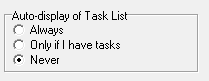
- It can be set up as a User Preference to Always display when you open a Module, or Only if you have Tasks or Never.
Last modified: Wednesday, 15 April 2026, 3:52 PM