Dental AI offers a hands-free approach to capture clinical data, which allows a Practitioner to maintain focus on the Patient during an examination. Such functionality streamlines the charting process by converting spoken dental terminology directly into digital records without manual typing, while vocal commands allow for real-time updates to clinical records through simple speech. By utilising specific trigger words for tooth numbers, surfaces, and procedures, your Practice ensures highly accurate record-keeping and live actions being performed on the Debtor dental chart.
The Contents of This User Manual:
Tooth Numbers
Tooth Surfaces
Mouth Regions
Procedures and Conditions
Charting Resets
This user manual will start on the Diagnosis/Observation screen.
For more information on the Voice Recording screen, please refer to the user manual: How to Add a Voice Recording.
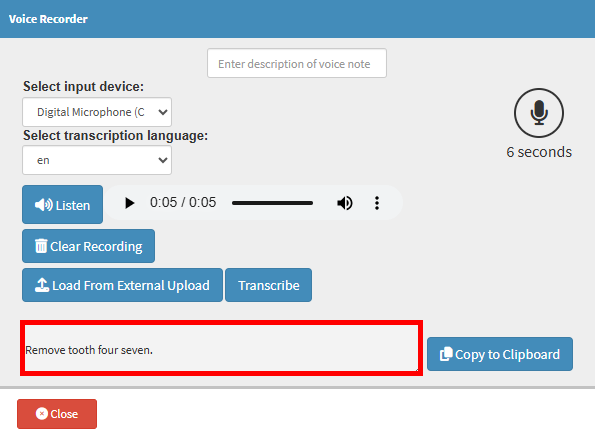
Click the Record button.
Record the procedure and Transcribe the recording you want to implement on the clients Dental record.
?Please Note: Make sure you pronounce it very clearly, and when referring to a number tooth, it should be pronounced in single digits, for example, tooth forty-seven should be said as tooth four seven. Find more in dept information in the last section of this user manual.
Click on the Close button.
The system will then Automatically Extract the tooth you requested to extract.
Tooth Numbers
Spoken tooth numbers must be provided in a digit-by-digit format for the AI to recognise the selection.
Adult Teeth: Say "one-one" for tooth 11 or "four-eight" for tooth 48.
Pediatric Teeth: Say "tooth six-four" to refer to primary tooth 64.
Tooth Surfaces
Clear pronunciation of surface names or individual letter codes is essential for the system to map the location accurately.
Full Names: Occlusal, Buccal, Mesial, Distal, Palatal, Lingual, and Incisal.
Abbreviated Codes: O, B, M, D, L, or I.
Combinations: When using multi-surface codes like "M-O-D," pause slightly between letters so the AI interprets the sequence correctly.
Mouth Regions
Specific regional terms allow you to identify groups of teeth for broader clinical observations.
Posterior: Use for back teeth, including premolars and molars.
Anterior: Use for front teeth, including incisors and canines.
Procedures and Conditions
Specific terminology and shorthand codes must be used to enable the system to update the status of a Dependant or Patient record.
Restorations: Use terms like Amalgam, Resin, Composite, or Porcelain.
Root Canals: Use RCT, ERCT (Emergency), or Post Treatment.
Missing Teeth: State "Missing with Gap" or "Missing without Gap" to describe the oral state.
Prosthetics: Phrases such as Implant, Bridge, or specific Crown types (Gold, Porcelain, Metal) are recognised.
Charting Resets
Reset commands provide a quick method to clear existing data from the screen when corrections are needed.
Reset [tooth number]: Saying "Reset tooth two-eight" clears charting from that specific tooth.
Reset full mouth: Saying "Reset full mouth" clears all charting from all teeth.