6. Debtors
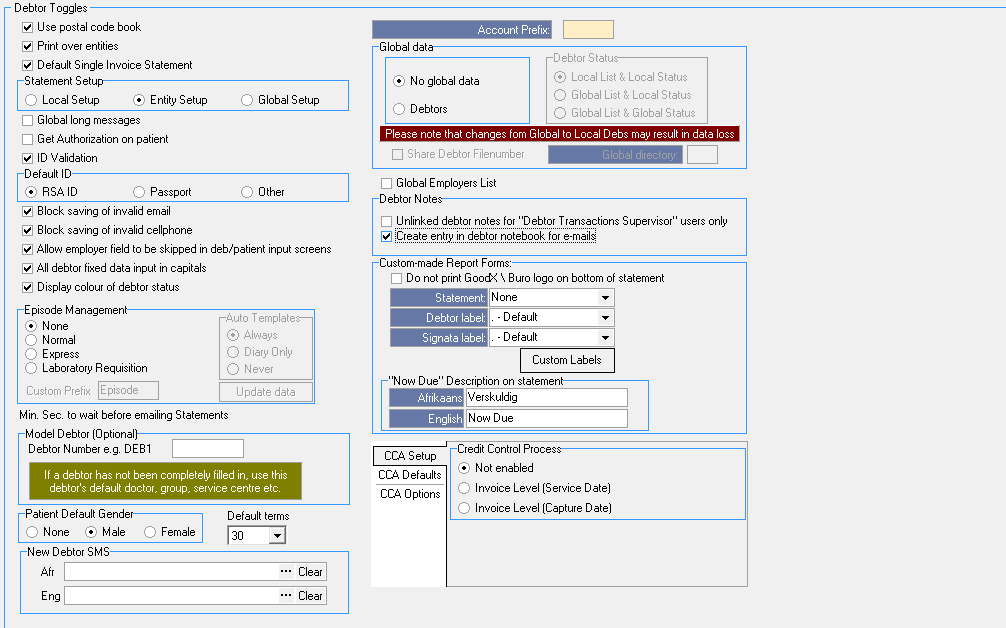
- Debtor toggles:
- Use postal code book: It will automatically pick up postal codes for all areas
- Print over entities: Set up a report over a few entities
- Default Single Invoice Statement: Will print singe Invoice on Statement that is outstanding
- Account Prefix: Is the Debtor Prefix
- Statement Setup:
- Local Setup: The Statement Setup is per station in a Practice
- Entity Setup: The Statement Setup is per entity in a Practice
- Global Setup: The Statement Setup, all entities will look at the same Statement Setup
- Global long messages: Actual Statement Settings that will permanently print a message out on statements
- Get Authorisation on patient: Only for certain disciplines where applicable
- ID Validation: Will do a valid/actual check if the ID number is correct and valid.
- Default ID: Tick the one below that will be defaulted on the Debtor Input screen to validate debtor
- Block savings of valid email: Won't save the debtor if the email isn't valid
- Block savings of invalid cellphone: Won't save debtor if the phone number isn't valid
- Allow employer field to be skipped in debtor input screen: Select if employer details can be skipped
- All debtor fixed data input in capitals: Force all input in Capital letters
- Display color of debtor status: To change the color of debtors on the debtor screen ex Active/Inactive/Discontinued
- Episode Management: Template tool for certain disciplines. Template to keep track and in sync with every Doctor and that specific Doctors billing. (Communication template Tool)
- None: Default
- Normal: Option for all Orthodontic Practices (this feature is used with a Payment Plan)
- Express: Client specific
- Laboratory Requisition: Option for all Pathologist Practices. Every Lab will get a specific lab reference number as per setup
- Min. Sec. to wait before emailing Statements: Takes GoodX time to generate batches of .pdf to send to Patients
- Model Debtor (Optional): The default debtor that will be mirrored for all new debtors (Doctor, Referring Doctor, Service Centre)
- Patient default Gender: The gender that will be the default option on the debtor input screen
- Default terms: The default set days a debtor/medical aid will have to settle/pay account for a patient
- New debtor SMS:
- Global data: Default Setup that must be sorted out before the site start. If all entities will share the same data according to:
- No global data - N/A
- Debtors & Medical Aids: (NOT ADVISABLE) - This means that all entities will share debtor information which may have legal implications
- Only Medical Aids: By default ON
- Lists & Medical Aids - N/A
- Debtor status: N/A
- Local List & Local Status:
- Global List & Local Status:
- Global List & Global Status:
- Share debtor File number: If global debtors will share the same file number or have separate file numbers per entity
- Debtor Notes:
- Allow users to edit or delete old notes (Debs & Creds): This setting MUST NEVER be switched on unless on request in writing from Doctor. No notes must be edited or deleted from the system.
- Unlinked debtor notes for Supervisors only: N/A
- Create entry in debtor notebook for emails: Every time you send an email it will automatically add the whole email/template/text in the notebook
- Custom-made Report Forms: The details that the Practice want to be printed on the Reports/Statements/Invoices
- Do not print GoodX/Buro logo on the bottom of the statement: This is only applicable if the Practice doesn't have their own logo
- Statement: Always default.
- Debtor label: By default, we always use the "Thermal Layout" (FCL to customize logo if otherwise requested)
- Signata label: By default, we always use the "Thermal Layout" (FCL to customize logo if otherwise requested)
- Custom labels: By default, we always use the "Thermal Layout" (FCL to customize logo if otherwise requested)
- "Now Due" Description on statement: Message that will be printed on Statement/Invoice/Age Analysis
- Afrikaans: Gelde Verskuldig
- English: Money Now Due
- Credit Control Process:
- CCA Setup: Processes for credit control. Credit Control processes setup for Invoices.
- Not enabled
- Invoice Level (Service Date): Date Invoice was posted
- Invoice Level (Capture Date): Date Invoice was captured