4. Financial & Creditors
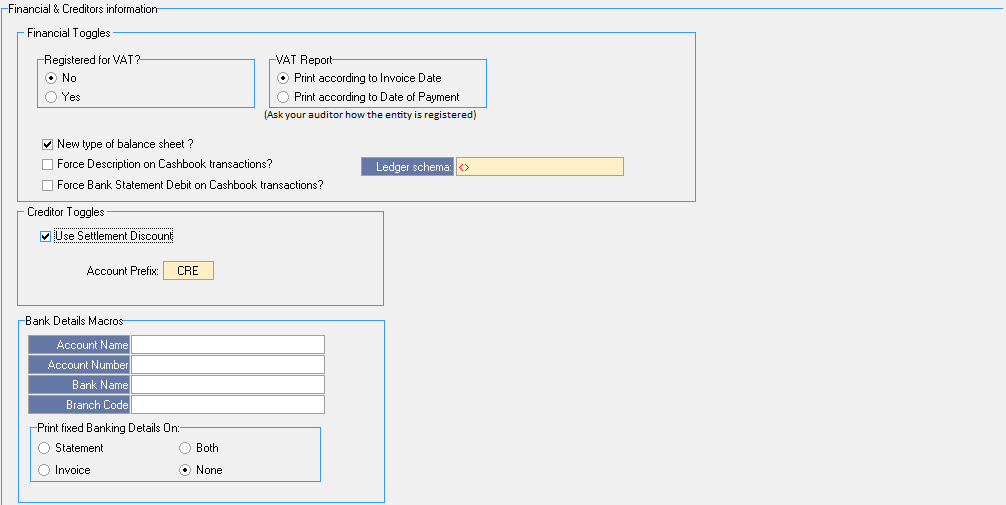
- Financial Toggles:
- VAT: GoodX only works on None or Inclusive of VAT
- No: If the Practice doesn't have a VAT number this Option will be selected
- Yes: If the Practice is registered for VAT this Option will be selected
- VAT Report: The moment an Invoice is posted you will get a VAT Report of the Invoices according to the next 2 options. (To be confirmed by Practice Auditor)
- Print according to Invoice date: Date the Invoice was posted
- Print according to date of Payment: Date the Invoice was settled/paid
- New Type of balance sheet: This option must always be marked/selected
- Force descriptions on Cashbook transactions: Main descriptions for all receipts on Cashbook
- Ledger schema: This option is used where you will see what Entity is linked to what Ledger Profile.
- Creditor toggles: This option allows you to give discounts on debtor accounts
- Use settlement discount (Always ON)
- Account Prefix - Creditor account prefix (Cannot be changed)
- Bank details: VERY IMPORTANT. The Practice/Dr's bank details must be completed here. This will be printed on the Invoices and Statements. VERY IMPORTANT to capture correctly.
- Print fixed banking details on This option (both) will always be on by default. The Practice banking details will print on the selected options below.