Setting up a Diary configures the Diary to match the practice's scheduling requirements. This includes setting up the information and options needed to manage practitioner availability and appointments correctly.
A correctly configured Diary provides a consistent structure for scheduling and helps ensure that appointments can be managed according to the practice's workflow.
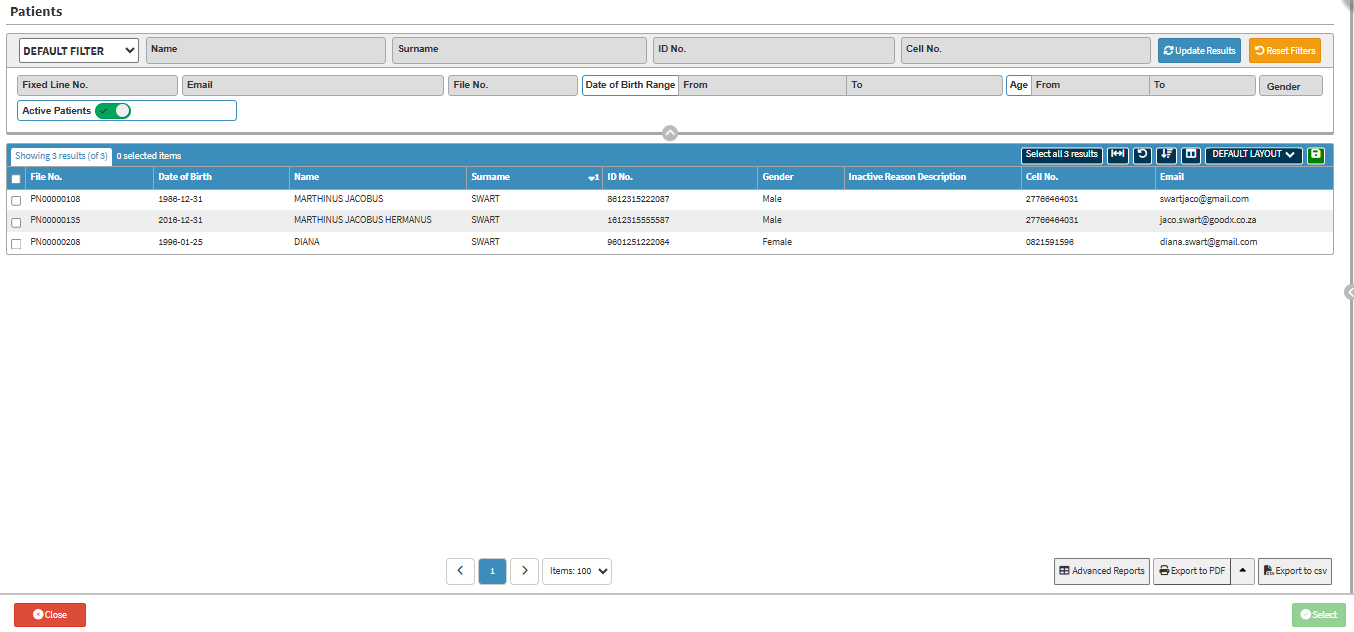
Default Filter: Selects the primary filter preset or criteria.
Name: Patient's first name.
Surname: Patient's surname.
ID No.: Patient's national identification number.
Cell No.: Mobile phone number.
Fixed Line No.: Searches by landline phone number.
Email: Contact email address.
File No.: Unique system-assigned file number.
Date of Birth: Options with two date fields used to search for patients born within a specific timeframe.
From: The start date of the birth date range using a date picker.
To: The end date of the birth date range using a date picker.
Age: Option with two numerical fields used to search for patients within a specific age range.
From: The minimum age limit.
To: The maximum age limit.
Gender: Recorded gender identity.
Active Patients: A three-way toggle slider that filters patient records by status.
Update Results Button: Refreshes the list based on current filter criteria.
Reset Filters Button: Clears all currently applied filter fields and resets them to default settings.
Screen Columns Action Buttons
Screen Column Action Buttons: Screen Columns Action Buttons provide tools to customise and refine the information displayed on a list screen. For details, see Screen Column Action Buttons Navigation.
Columns
File No.: Unique system-assigned medical file number.
Date of Birth: Patient's birth date.
Name: Patient's first name.
Surname: Patient's family or last name.
ID No.: Official national identification number.
Gender: Recorded gender identity.
Inactive Reason Description: Reason for archiving or marking the patient record inactive.
Cell No.: Primary mobile phone number.
Email: Contact email address.
Page Options
Page Options: Page Options provide additional tools for navigating, managing, and exporting the information displayed on a page. For details, see Page Options Navigation.
Last modified: Wednesday, 11 November 2026, 3:08 PM