Glossary: Kanban View - Tasks
VIDEO
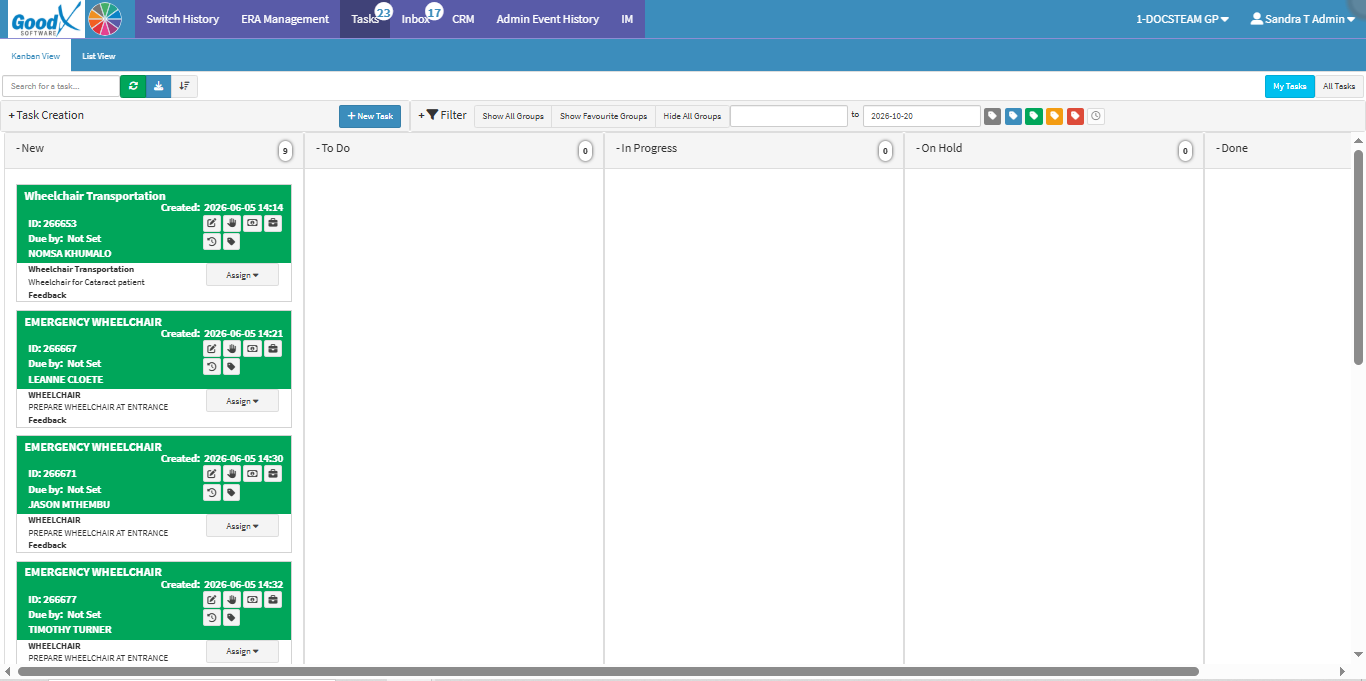
Why This Matters? The Kanban View presents Tasks as cards grouped under their current status or stage. This provides a visual representation of how Tasks are progressing through the workflow. This format makes it easier to see how work is distributed across stages and identify Tasks that are still in progress or need attention. It provides a clear overview of the team's workload and progress
Start on the Tasks screen.
Sections
Task management toolbar
Action buttons
Filters
Columns
Task Management Toolbar
Search for a task: Locates specific tasks using keywords, task names, or IDs.Refresh tasks: Fetches and updates the view with the latest task data.Load more tasks: Retrieves additional or older tasks to the current list view.Sort all the tasks: Reorders tasks by creation date, due date, or priority.My Tasks: Filters the list to display only tasks assigned to the currently logged-in user.All Tasks: Removes assignment filters to show all practice-wide tasks you have permission to view.
Action Buttons
Task Creation: Primary controls to start new tasks or workflows.
New Call Event: Prompts you to log and schedule a telephonic or communication event.Search for Debtor by: Finds debtor accounts by account number, name, or ID to link to tasks.
New Task: Opens a form to create and assign a task with details like title, priority, and due date.
Filters
Filter: Narrows down tasks by status, group visibility, date range, priority, or snooze state.
New: New tasks that have not yet been started.To Do: Pending tasks queued for action.In Progress: Tasks currently being worked on.On Hold: Tasks paused or awaiting further input.Done: Completed tasks.Closed: Finalised and closed tasks.
Show All Groups: Tasks across all status categories.Show Favourite Groups: Tasks or categories marked as favourites.Hide All Groups: Collapses all category groups.From date: Sets the starting date for the filter range.To date: Sets the ending date for the filter range.Unknown: Filters for tasks with no priority level assigned (grey).Low: Filters for non-urgent tasks (blue).Normal: Filters for standard priority tasks (green).High: Filters for high-priority tasks (yellow).Very Urgent: Filters for critical tasks needing immediate action (red).Show snoozed tasks: Shows or hides temporarily deferred tasks.
Columns
New: Tasks that have been newly created and have not yet been started.To Do: Pending tasks queued for action.In Progress: Tasks that are currently being worked on.On Hold: Tasks that are temporarily paused or awaiting further input.Done: Tasks that have been completed.
Last modified: Thursday, 12 November 2026, 11:22 AM