Skip to main content
Skip accessibility options
Reset settings
Close
Accessibility profiles
Visual impairment
Seizure and epileptic
Color vision deficiency
ADHD
Dyslexia
Learning
Content adjustments
Readable font
Dyslexia-friendly font
OpenDyslexic
Highlight headings
Highlight links
Highlight buttons
Hide images
Tooltips
Stop animations
Text size
+
+ +
+ + +
Line height
+
+ +
+ + +
Text spacing
+
+ +
+ + +
Color adjustments
Dark contrast
Light contrast
Invert colors
Change colors
High contrast
High saturation
Low saturation
Monochrome
Orientation adjustments
Reading guide
Reading Mask
Big black cursor
Big white cursor
Desktop for Hospitals
Close sidebar
Sections
Close tab
Search
Home
Courses
Desktop for Hospitals
Authorisation & Confirmation
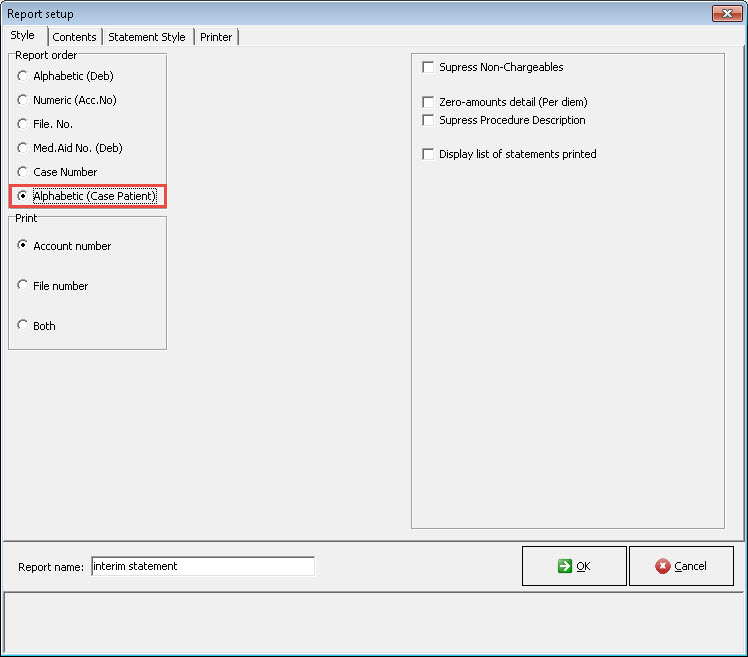
Statement: Sort per Patient Name
Statement: Sort per Patient Name
New Style Function "Alphabetic (Case Patient)" has been added.
Users will now be able to search for Patient Surnames per Case.
Last modified: Monday, 15 April 2019, 2:09 PM
◄ Reversing a Claim from the Case Management Screen
Jump to activity
Jump to activity
DA: Walk-in and Emergency Appointment
Finalise the Case (Desktop)
Auto Finalise Fixed Fee/Per Diem Case (Desktop)
Account screen Re-submission (Desktop)
Authorisation & Confirmation
Sending through a claim
Submitting WCA and RMA Claims
Submit EDI
EDI Response
Reverse Claim
Resubmitting a claim
Claim History
Claim Submission: Zero Amounts
WA: Switch Response
Submitting a Claim from the Case Management Screen
Reversing a Claim from the Case Management Screen
Shift bulk Credit Control Assistant
Add "Fin 2018" to Report instead of only 2018
DA: Navigate to Case Screen
DA: Case Management Screen Overview
DA: Case types and Type of Cases
DA: Create a New Hospital Case
DA: Case Status
DA: Case Print and Label Printing
Account Enquiries
Account enquiry: Item Level
Case Statements
Unlinked Receipt
Add to Receipt
Unlinked Receipts
Link an Unlinked Receipt
Relink an unlinked account. Receipt - Invoice level
Unlinked Receipt Report
Receipts Written Back
Per Case ERA's (Electronic Remittance Advice)
Credit Notes (Desktop)
Patient and Medical Aid Paid
Shift outstanding amount to Patient/Medical Aid
Refund to Patient/Medical Aid (Desktop)
Refund to Patient/Medical Aid Written Back
Patient Validation
Patient import
DA: Create a New Case with a New Debtor
DA: Create a New Case with a IOD Debtor
DA: Create a New Case with an Existing Debtor
DA: Create New Debtors and Dependants - Using the Import Data function
DA: Add Dependants
DA: Notebook
DA: Admission details (Case Management Screen)
DA: Edit Debtor Information
Journals: Bad Debt, Discount and Opening Balances
Add Debtor Journals: List
Using the Credit Control Assistant to collect Outstanding Accounts
How to Create a Credit Note
Print/Save Statement as PDF
How to Post a Journal for Hospitals
How to Shift Amounts on Case Invoices
Co-payments & Deposits - Unlinked Receipts
Co Payments & Deposits
DA: To Access the Patient Clinical Information
DA: Clinical Notes
DA: Clinical Reports
DA: History
DA: Clinical Info
DA: Deleted Allergies
DA: Billing Class or Dispensing Method
DA: Set Up Combinations
DA: Estimates
DA: Invoicing
DA: PPE Billing/Invoicing (NHN Medikredit)
DA: Fixed Fees
DA: Capturing Per Diem Procedures
DA: Change Billing Class/Dispensing Method on Account screen
DA: Adding multiple CPT codes to Case Management
DA: Billing ICU with 0018 modifiers
Enable Balance Billing for Hospitals (Desktop)
Discharging a Patient without the Bed Managament
Make a Patient Inactive
Demographic data sync between entities (ZAH Only)
DA: Discharge Form
User Preference: General Tab
Add a Treating Doctor
Add a Referring Doctor
Add an Assistant
Add an Employer
Create a Service Centre
Debtor Status List
User Preference: Medical/Paramedic Tab
Setup Debtors' Status
File Cover Sheet
Copy Debtors - New Medical Aid
Copy Debtor account to another Entity
Change Debtor Type (Normal, IOD, etc.)
Log: Data Changes
Archive Enquiry
Message Book
Task list
Debtor Document From MedDebs
Shift bulk Credit Control Assistant ►