The treating doctor is the doctor that is currently consulting the patient. The treating doctor might refer the patient to a specialist if he is unable to treat the patient.
Sign into the GoodX Desktop using your GoodX username and password.
Click on the Med Debs module
Navigate to the Lists tab on the navigation bar.
Scroll down to Doctors option and click on it
A new screen - Practitioners will open up to add a new doctor onto the list that has already been loaded onto the system.
Click on the plus button to add a new doctor
Plus button
A new screen will open up - Doctors not linked to this practice where you will be able to add the doctor's details
All fields need to be filled in correctly and accurately
If you do not fill in the details correctly the medical aid will reject the claims sent by this doctor.
The Practice number, discipline and speciality code is extremely important that this is filled in accurately.
After all the fields have been filled in click on Save (F2) to save the entry and exit this particular screen.
Save button
The doctor will no appear on the list with all the other doctor's listed
When done viewing the screen, click on OK (F2) to exit the screen and navigate back to the main Debtor Manager screen.
OK (F2) button
Last modified: Wednesday, 21 October 2020, 3:04 PM


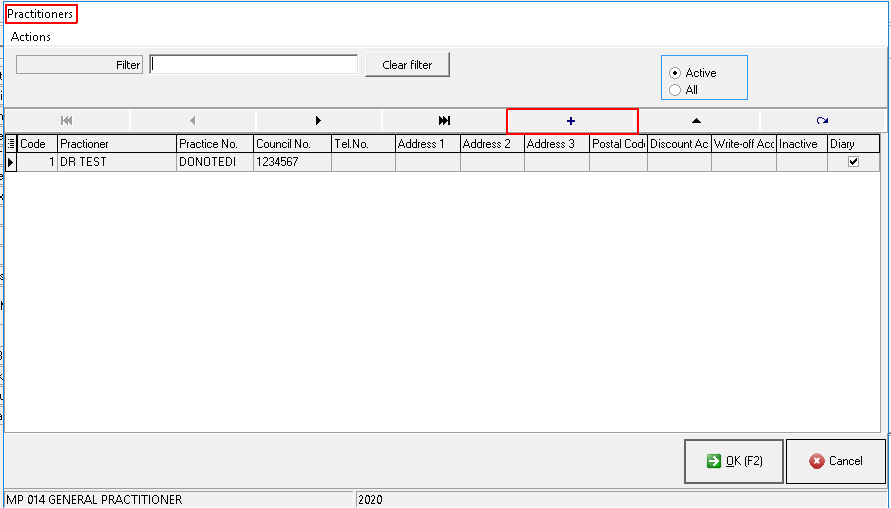
 Plus button
 Save button
 OK (F2) button