Text size
Line height
Text spacing
Securing clinical documentation ensures that the medical history of a Patient remains accurate and legally defensible within the Practice. These measures prevent unauthorised edits to a finalised record, which protects the integrity of the data captured by a Practitioner during a consultation. Implementing these restrictions also facilitates compliance with privacy regulations by providing a reliable and permanent audit trail for every Debtor account.


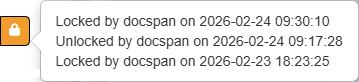
?Please Note: Once the section is locked, you can not edit the section, and you will have to click on the Locked button to unlock the section to edit or add information.