- Creditors Module - Fixed Data
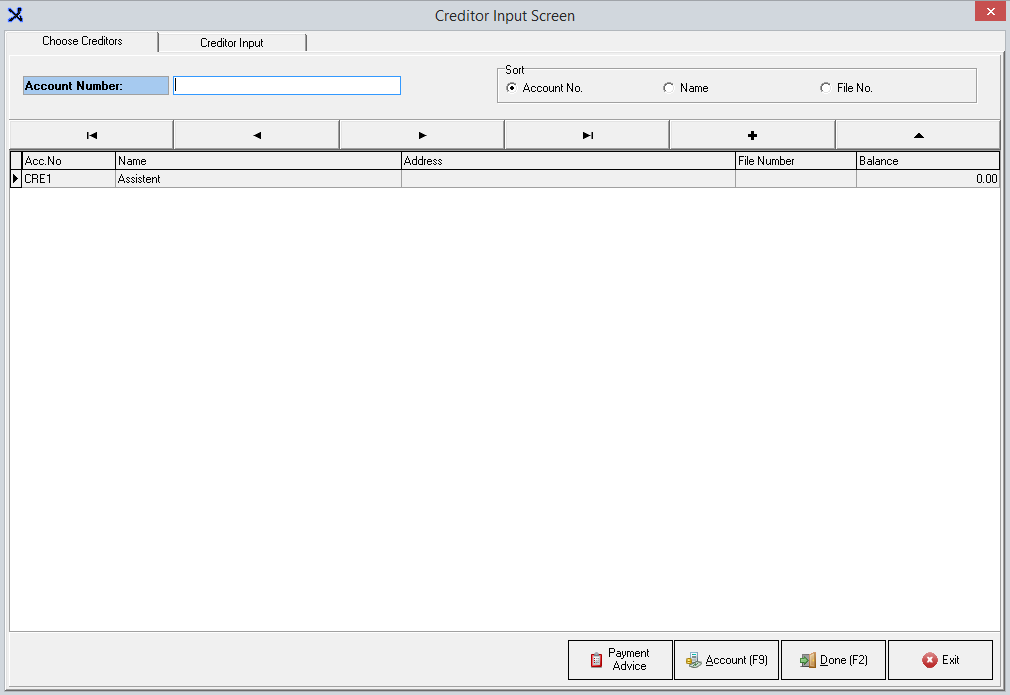
- This screen shows a list of existing creditors. Press (+) button or select Creditor
Input tab at the top of the screen to create a new Creditor.


- This is the Creditor Input screen. Enter the details of your new Creditor.
- Under "Creditor Type",
select "Assistant"
- Under "Payment
Agreement", select appropriate option
- Click "Save"/F2, and
Click "Yes" when prompted
The Creditor has now been added. The
Creditor now needs to be linked to an expense account. Navigate to MedDebs
module in the main navigation screen.
TAKE NOTE: Please follow the link on Adding an Assistant as a Creditor in MedDebs, Link Assistant to a Creditor and View Creditor Account for more information.
Last modified: Monday, 12 October 2020, 2:50 PM