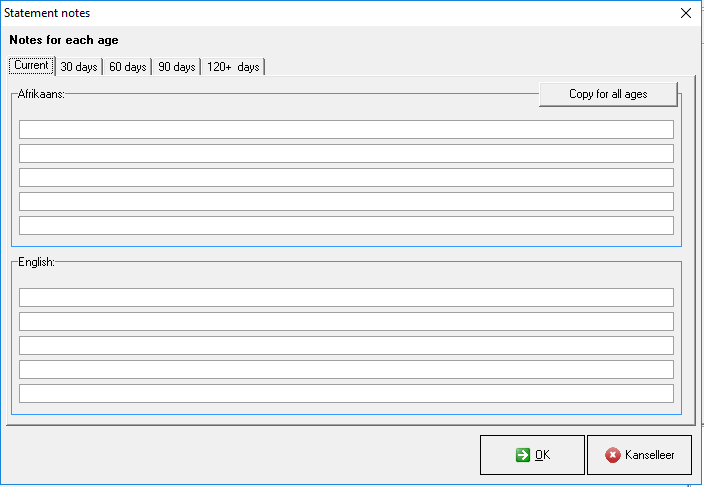
Notes can be made on statements regarding specific outstanding ages for example current, 30 days, 60 days 90 days etc. These notes can be made in Afrikaans or/and English and will also print on the statements stating these specific outstanding ages.
Sign in to the GoodX Desktop using your GoodX username and password.
From the Navigator Double Click on the MedDebs Module
Set-Up of Notes
On the main MedDebs Page, in the menubar Click on Print
Click on Statement notes (per age category)
You will be directed to the Statement Notes Screen
Here you are able to add custom notes to the statement
Type your message that you wish to add in the lines provided
You can make different notes for each age by clicking on the relevant age tab .
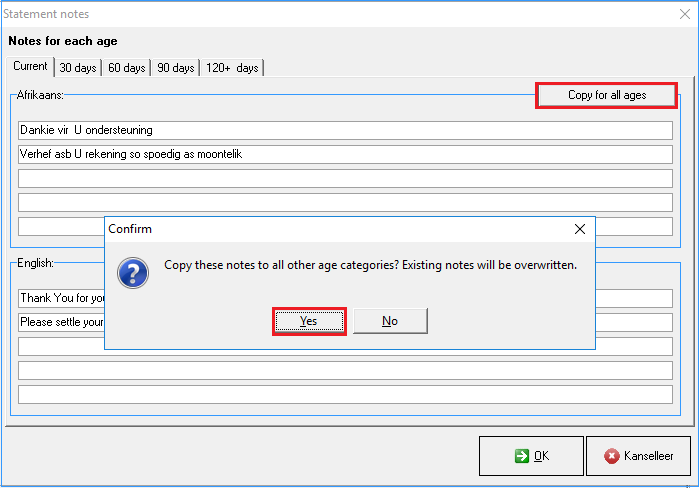
If you would like to have the exact same message on each age :
Click on the Copy for all ages button to copy all the text from the Current age tab
Click on Yes to confirm this action or No to cancel
You will see all your age tabs will have exactly the same text in the text boxes
When you are done and satisfied with the content of your message you can click on OK to save your message
If you click on Kanselleer you will be directed back to the main MedDebs screen and your information will not save
You will be directed back to the main MedDebs screen
An example of what it will look like on your statement