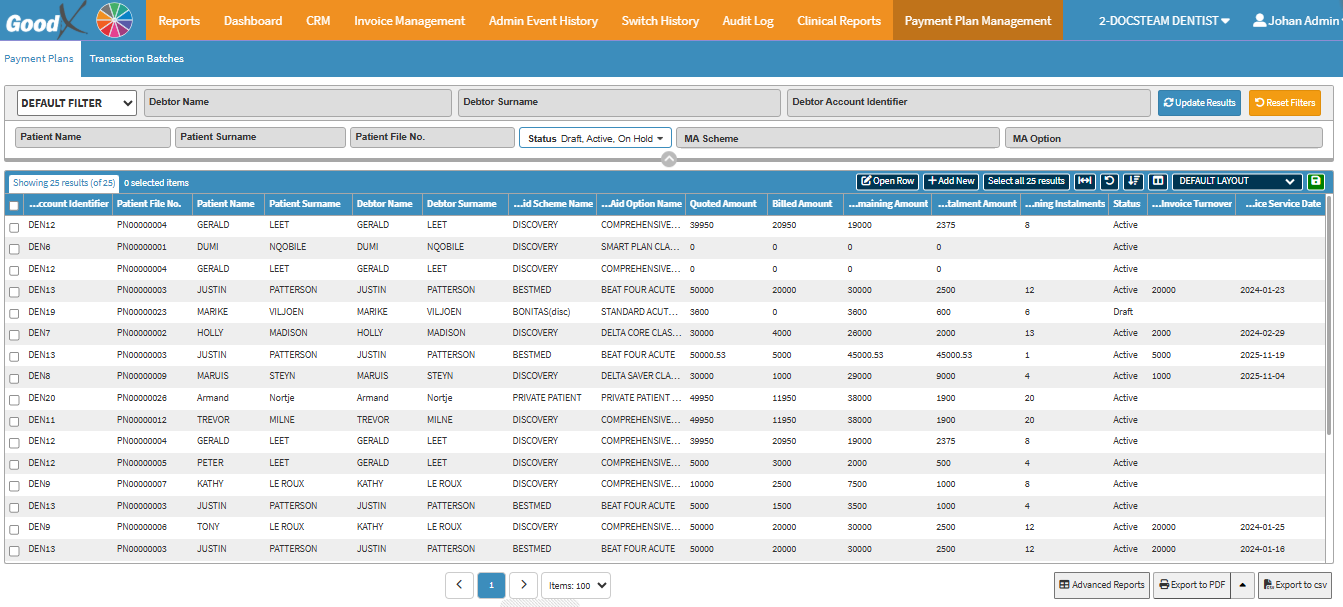
The Payment Plan Management Tab provides a structured way to manage how Patients or Debtors settle outstanding balances over time. By setting up instalments, tracking remaining amounts, and reviewing payment progress, the Practice can ensure clear financial planning and maintain accurate account management. This feature helps streamline communication with Patients or Debtors while supporting transparency and accountability in payment handling.
?Please Note: This feature is not available to all users and must be requested to set up for your Practice.
Default Filter: Select a pre-configured or standard filter layout from the drop-down menu.
Debtor Name: The first name of the person responsible for paying the account.
Debtor Surname: The last name of the person responsible for paying the account.
Debtor Account Identifier: The unique account number, code, or reference ID assigned to that debtor in the system.
Patient Name: The first name of the patient receiving treatment or care.
Patient Surname: The last name of the patient receiving treatment or care.
Patient File No.: The unique internal reference or file number assigned to the patient's record.
Status: The current state of the payment plan.
MA Scheme: The specific Medical Aid scheme/provider linked to the patient or account.
MA Option: The specific plan or option level selected within the Medical Aid scheme
Update Results: Applies the selected filter parameters and refreshes the list on screen.
Reset Filters: Clears all entered filter values and restores the view to default.
Screen Columns Actions
Screen Column Action Buttons: Provides tools to customise displayed columns and save preferred layouts for future use. For details, see Screen Column Action Buttons Navigation.
Columns
Account Identifier: A unique number or code that identifies the debtor or patient’s account in the system.
Patient File No.: The internal reference or file number assigned to the patient’s record.
Patient Name: The first name of the patient receiving treatment or care.
Patient Surname: The last name of the patient receiving treatment or care.
Debtor Name: The first name of the person responsible for paying the account.
Debtor Surname: The last name of the person responsible for paying the account.
Scheme Name: The name of the patient's Medical Aid scheme or provider.
Option Name: The specific plan or option level selected within the Medical Aid scheme.
Quoted Amount: The total amount quoted before services or treatment were rendered.
Billed Amount: The total amount officially charged for the services or treatment.
Remaining Amount: The outstanding balance still owed after payments are made.
Instalment Amount: The agreed recurring amount to be paid in each instalment.
Remaining Instalments: The number of payment instalments still outstanding.
Status: The current state of the payment plan.
Invoice Turnover: The total cumulative value of services or treatments billed to the account.
Page Options
Page Options: Provides tools to navigate between pages, adjust the number of Items displayed, and export or save data for further use. For details, see Page Options Navigation.